 arclang
Diagrams
ArcLang diagrams are not drawn, they are compiled. Each view is computed from the model, laid out automatically, and drawn in Arcadia notation. A diagram can therefore never disagree with the model, and it costs nothing to keep up to date.
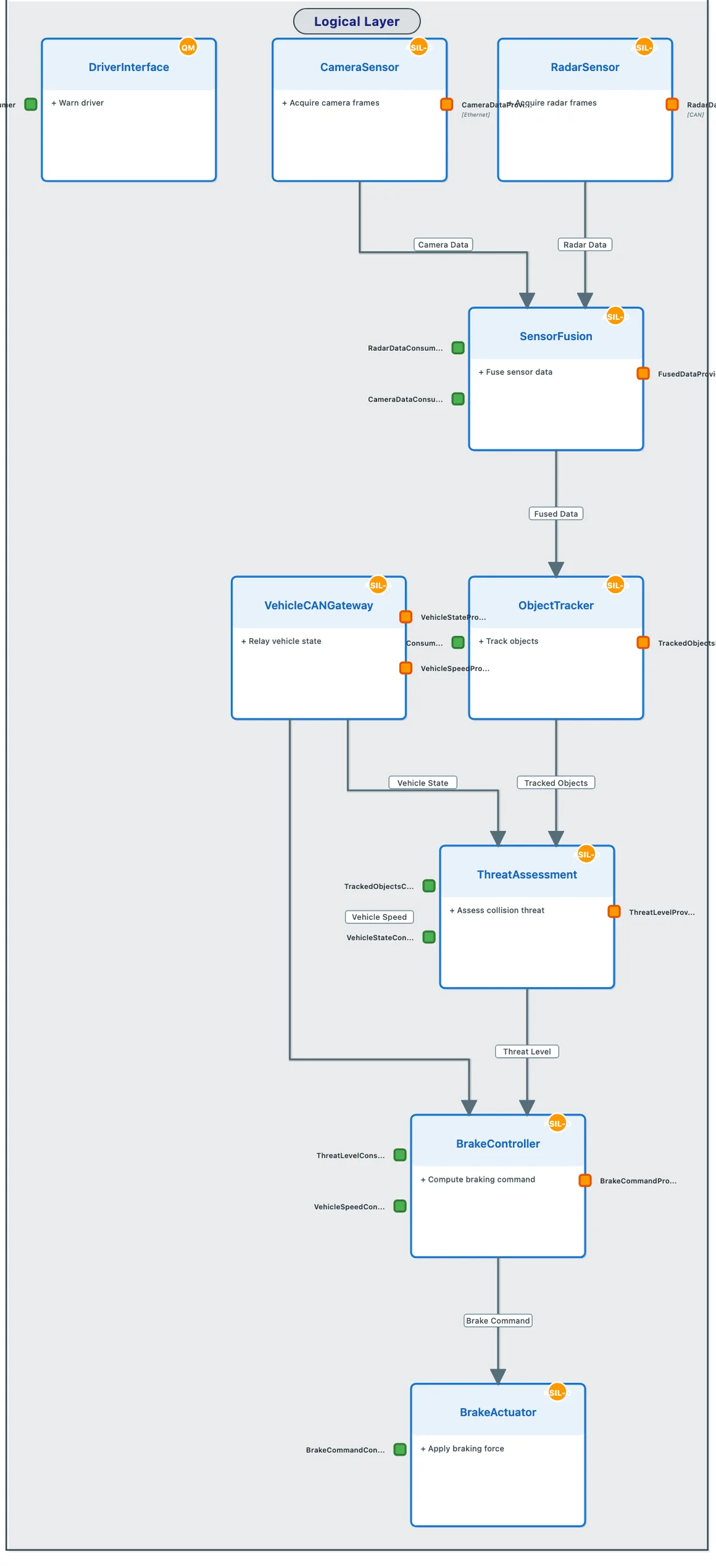
Open the live viewer for the emergency braking example of the repository. It is the file the command below writes: one HTML page with no network access.
Generate the viewer
$ arclang diagram examples/automotive/emergency-braking/complete_emergency_braking_simple.arc -f html -o aeb.html
✓ oab — 8 nodes, 6 edges
✓ sab — 13 nodes, 7 edges
✓ lab — 23 nodes, 10 edges
✓ pab — 26 nodes, 9 edges
✓ cap — 11 nodes, 10 edges
✓ cdb — 16 nodes, 8 edges
✓ req — 24 nodes, 18 edges
✓ par — 13 nodes, 6 edges
✓ gv — 71 nodes, 16 edges
✓ iv:Emergency Braking - Operational View — 4 nodes, 0 edges
✓ afv:AEB System - Functional View — 16 nodes, 11 edges
✓ iv:AEB System - Component Structure — 10 nodes, 10 edges
✓ iv:AEB System - Hardware Deployment — 16 nodes, 9 edges
✓ msm:AEBOperatingModes — 5 nodes, 6 edges
✓ es:EmergencyStop — 6 nodes, 5 edges
✓ lab:Braking chain — 10 nodes, 2 edges
✓ pab:Around the brake ECU — 14 nodes, 2 edges
  Output: aeb.html
Each line is one view, with the number of boxes and connections it draws. The file embeds its layout engine, so it opens from a disk, an intranet or a review attachment without contacting any server.
The views
| Code | View | What it draws |
|---|---|---|
oab |
Operational architecture | Entities and actors, their activities, the interactions between them |
sab |
System architecture | System functions, their ports and functional exchanges, the actors around the system |
lab |
Logical architecture | Components, nested components, the functions allocated to each, ports and component exchanges |
pab |
Physical architecture | Nodes, the components deployed on them, physical links |
cap |
Missions and capabilities | Missions, capabilities, what they involve and realize, and their extend, include and generalization relations |
cdb |
Data model | Classes with their fields in declared order, enumerations, data types with their unit, exchange items |
pbs |
Product breakdown | The EPBS tree of systems, subsystems and items |
msm |
Modes and states | One diagram per state machine |
es |
Scenarios | One sequence diagram per scenario, with lifelines and ordered messages |
A view appears when the model has something to put in it. --view keeps one kind:
$ arclang diagram examples/automotive/emergency-braking/complete_emergency_braking_simple.arc -f html --view lab -o lab.html
✓ lab — 23 nodes, 10 edges
✓ lab:Braking chain — 10 nodes, 2 edges
  Output: lab.html
Declare a diagram
A view draws a whole level. A Capella diagram shows what was put on it; ArcLang writes that down as a diagram declaration: the view it is cut from and the elements it shows, by id or name. What holds a shown element is drawn around it, and only the exchanges between drawn elements are drawn. With context: true the elements an exchange ties to a shown one come too, as a contextual diagram.
logical_architecture LA {
    component "Perception" {
        id: "LC-PER"
        component "Radar" { id: "LC-RAD" function "Detect obstacles" {} }
        component "Camera" { id: "LC-CAM" }
    }
    component "Decision" { id: "LC-DEC" }
    component "Actuation" { id: "LC-ACT" }
    component_exchange "tracks" { from: "LC-RAD" to: "LC-DEC" }
    component_exchange "command" { from: "LC-DEC" to: "LC-ACT" }
}

diagram "Radar to decision" {
    view: lab
    description: "The radar, what holds it, and what it talks to"
    shows: ["LC-RAD"]
    context: true
}
The declared diagram appears beside the whole view, under the same tab, and in the model tree as Logical: Radar to decision. It draws Perception with only Radar inside (and its function), Decision because the tracks exchange ties it to the radar, and that one exchange. Camera, Actuation and command stay out. The views are oab, sab, lab, pab, cap, cdb and pbs; a name that no element of the view answers to is reported in the viewer's notes, not silently dropped.
One product, one concern
configuration: draws the architecture of one configuration: the variants it does not select stay out. Elements carry tags:, and tagged: draws only the elements carrying one of the tags, with what holds them; under: draws what is under one element instead of naming them. A safety view or a security view is then one line, kept up to date by the tags.
logical_architecture "Logical" {
  component "Body" {
    id: "LC-BODY"
    component "Airbag controller" { id: "LC-AIRBAG" tags: ["Safety"] }
    component "Seat heater" { id: "LC-SEAT" tags: ["Comfort"] }
    component "Belt tensioner" { id: "LC-BELT" tags: ["Safety"] }
  }
}

diagram "Body safety" { view: lab under: "LC-BODY" tagged: ["Safety"] }
In SysML v2 a tag is a metadata definition of a Tags package, applied as @Safety;, and the diagram is a view that exposes LC-BODY::** and filters on @Safety: SysML v2 tools draw the same view, and the import reads it back.
What the viewer does
- One tab per kind of view, and a model tree that shows how each view nests.
- Navigation across Arcadia levels. Selecting an element lists the other views that draw it and the elements it is traced to. From a logical component you jump to the requirement it satisfies or the physical node it is deployed on, and come back.
- Functional chains. Selecting a chain highlights its functions and exchanges, in order, and the chains it involves. A chain with control nodes shows them over the sheet (a bar for
and, a diamond fororanditerate) with its sequence links and their conditions. - Folding. A container folds into one box (double-click, Enter, or "Fold all"); its exchanges then end on the box. A container can also be opened as a diagram of its own, with what it exchanges with drawn around it.
- Arrangement. With "Arrange" on, you drag a box where you want it and its exchanges are redrawn at right angles.
- Export. SVG and PNG per diagram, and one print page per diagram.
Keep an arrangement with the model
Folds, the open container and the arrangement are remembered by the browser while you work. "Save layout" downloads them as <model>.layout.json. Kept next to the model, that file is read by arclang diagram and arclang explorer (or named with --layout), so an arranged diagram is shared and versioned like the rest. The workbench in VS Code and the playground write the same file as you drag, resize and bend: positions, sizes, bends, folds, and the layers, groups, stacking order and locks of the sheet.
The layout file only says how to show the model. What it names that the model no longer draws is reported and left out, and a file that is not a layout stops the command.
The architecture document
arclang explorer writes a complete architecture document: requirements, components, the traceability matrix, and the same viewer, in one self-contained file.
$ arclang explorer examples/automotive/emergency-braking/complete_emergency_braking_simple.arc -o dossier.html
🔍 Generating Architecture Explorer from examples/automotive/emergency-braking/complete_emergency_braking_simple.arc...
✓ Architecture Explorer generated successfully
  Input: examples/automotive/emergency-braking/complete_emergency_braking_simple.arc
  Output: dossier.html
  Data: dossier.json
  Requirements: 7
  Components: 20
  Interfaces: 21
  Functions: 17
… (7 more lines)
Diagram data for other tools
-f viewpoints writes the diagram model as JSON (nodes, ports, edges, with stable identifiers), and -f elk the layout graphs. -f mermaid, the default format, writes a Mermaid text diagram for documentation pipelines.
$ arclang diagram examples/automotive/emergency-braking/complete_emergency_braking_simple.arc -f viewpoints --view pab -o pab.json
✓ pab — 26 nodes, 9 edges
✓ pab:Around the brake ECU — 14 nodes, 2 edges
  Output: pab.json
Edit on the sheet, in the playground
The playground is a workbench over the same viewer: an explorer, the source, the sheet, and the properties of what is selected. Every gesture on the sheet is written in the source by the compiler's own editor, so the text stays the only model, and the compiler checks it after each change.
The palette beside the sheet follows the view shown. Architecture views create entities, actors, functions, components, nodes and interfaces; place a function on a component by dragging; declare ports by dropping the Port tool on a box's edge; draw an exchange from one box to another; collect functions into a chain or links into a physical path; make a type from an element and apply it elsewhere, as Capella's REC and RPL. Modes and states add states, modes, transitions and the initial state, nested in a state when it is clicked. Scenarios add participants and messages, and wrap chosen messages in a combined fragment. A declared diagram shows or hides elements; any view opens a new diagram around a selection.
A box is renamed by double-click or F2, and its references follow. Delete removes the declaration. Undo and redo (⌘Z, ⇧⌘Z) cover every change, typed or drawn; Save (⌘S) downloads the file and keeps a draft in the browser; Revert returns to the last save. Design mode (⌘⇧M, or the Design button) gives the whole window to the sheet and the palette, Esc leaves it.
Tables and matrices
A table is computed by the compiler, like a diagram: arclang table gives the requirement coverage, the traceability matrix, the allocation matrix, the N² interface matrix, the interface control document (ICD, one row per exchange) and a table of the elements of any kind, as JSON (with ids and UUIDs), CSV, TSV, Markdown, HTML or Excel.
$ arclang table examples/automotive/emergency-braking/complete_emergency_braking_simple.arc --kind requirements_coverage --columns id,name,verified_by,verdict -f md
## Requirement coverage

7 rows: 0 ok, 7 pending. Gate ISO26262: passed.

| Req id | Name | Verified by | Verdict |
| --- | --- | --- | --- |
| REQ-AEB-001 | Obstacle detection range | Radar range verification (pending) | pending |
| REQ-AEB-002 | Sensor fusion latency | Fusion latency measurement (pending) | pending |
| REQ-AEB-003 | Collision risk assessment | TTC computation analysis (pending) | pending |
| REQ-AEB-004 | Emergency braking activation | Emergency braking activation test (pending) | pending |
| REQ-AEB-005 | Driver warning | Driver warning demonstration (pending) | pending |
| REQ-AEB-006 | Driver override | Driver override demonstration (pending) | pending |
| REQ-AEB-007 | Health monitoring | Fault injection campaign (pending) | pending |
The requirement coverage table includes the verdict of each test case as the gate sees it, including the verdicts of simulations. Useful options: --scope (a layer, or an element) and --row-type for what the rows are taken from, --columns and --rows for a matrix, --kinds for the trace kinds, --filter (words, column:text, column=text, column!=text, is:gap, -term) and --gaps for the rows with a gap or a failure, --gate-standard. -f xlsx -o file.xlsx writes a workbook with a frozen, filterable header and status colors.
A table the model declares is computed the same way and is shown by the workbench. --declaration prints the table declaration for the table you asked for, ready to paste into the model:
$ arclang table examples/automotive/emergency-braking/complete_emergency_braking_simple.arc --kind elements --row-type Requirement --columns id,name --declaration
table "Elements" {
    kind: elements
    row_type: "Requirement"
    columns: ["id", "name"]
}
arclang table --list lists the declared tables and the kinds the compiler computes. In VS Code the tables are live: see Tables and matrices there.
What is checked
A port that does not resolve, a function allocated twice and two elements that collide on one identity are reported; they are never drawn as a guess. The diagram model is golden-tested, and continuous integration lays out and draws every example of the repository in a headless browser.
Limits
- Layout is automatic. The arrangement mode moves boxes; it does not route exchanges around other boxes, and there is no free-form drawing.
- Scenarios draw lifelines, ordered messages and combined fragments (loop, opt, alt, par, seq, critical) as frames over their rows; a frame is not selectable on the sheet, its messages are. A state, mode or function asserted on a lifeline is a rounded box on it, spanning the messages of its body.