 arclang
CESAM in ArcLang: the grid on an Arcadia model
CESAM (CESAMES Systems Architecting Method) and Arcadia describe a system with the same content, organized differently. An Arcadia layer (operational analysis, system analysis, logical and physical architectures) is one abstraction level covering several perspectives; a CESAM vision is one perspective covering several levels. ArcLang keeps one model and shows it both ways: the Arcadia layers you write, and the CESAM grid the compiler computes from them.
This page is the reference. To learn by doing, follow the CESAM tutorial: nine exercises, each checked by the compiler.
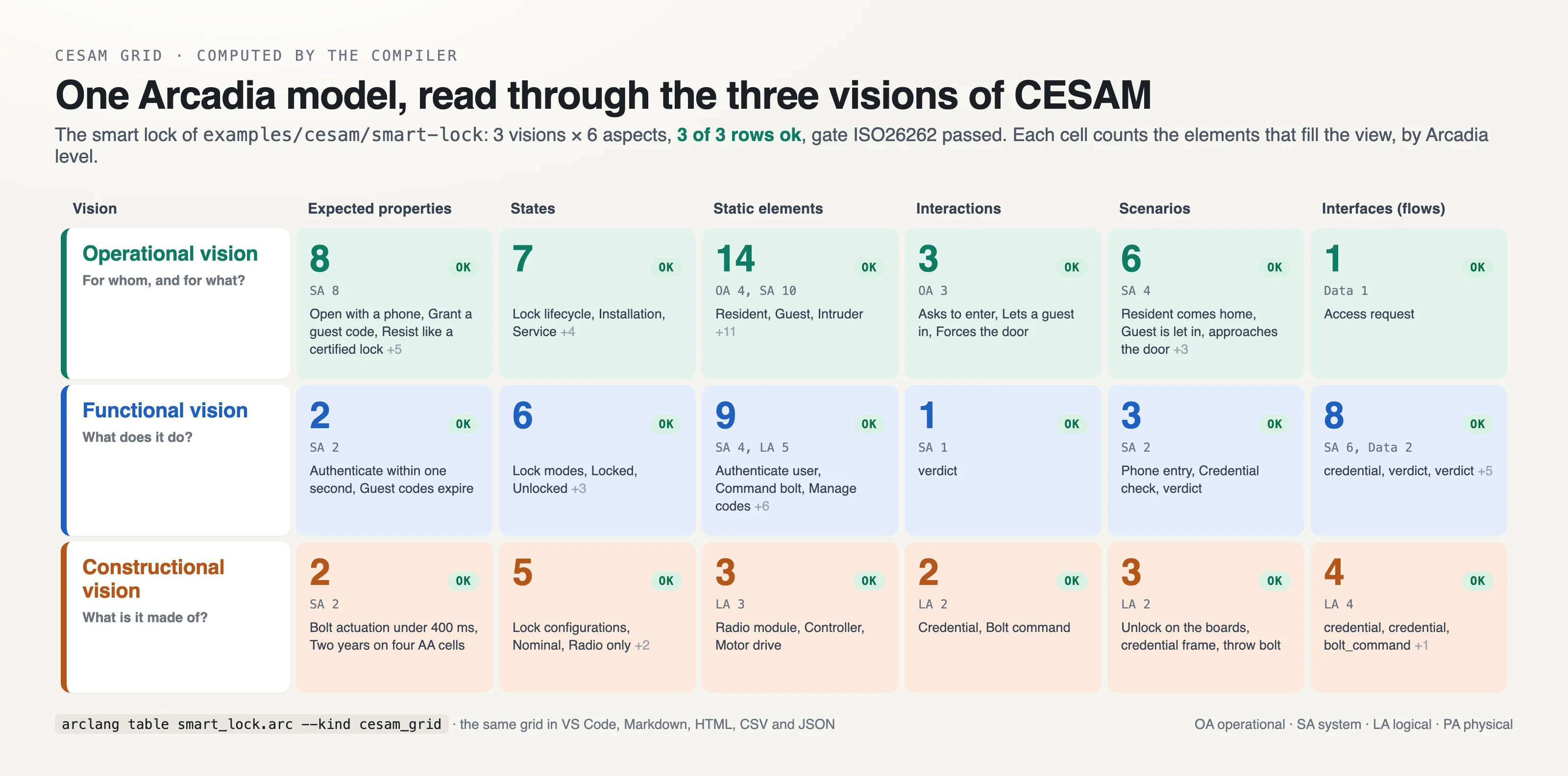
The grid
CESAM studies any system under three visions, each seen through six aspects:
| Vision | Question | Expected properties | States | Static elements | Interactions | Scenarios | Interfaces (flows) |
|---|---|---|---|---|---|---|---|
| Operational | why? | stakeholder requirements | lifecycle | stakeholders, use cases | environment | operational scenarios | operational interfaces |
| Functional | what? | functional requirements | functional modes | functional breakdown | functional interactions | functional scenarios | functional interfaces |
| Constructional | how? | technical requirements | technical configurations | product breakdown | constructional interactions | constructional scenarios | constructional interfaces |
arclang table model.arc --kind cesam_grid -f md      # or json, csv, html, xlsx
arclang table model.arc --kind cesam_grid --scope LA # one abstraction level
arclang table model.arc --kind cesam_grid --scope "Controller"   # one system of interest
Each cell lists the elements and exchanges of that view and says how mature it is: gap when nothing is modelled yet (the issue names the Capella diagram that draws it), pending when the production gate flags one of its elements, ok otherwise. Each cell also counts its elements per Arcadia level, so the grid shows how deep each perspective goes. In VS Code the table view offers the kind CESAM grid; in a generated document, {{table cesam_grid}}.
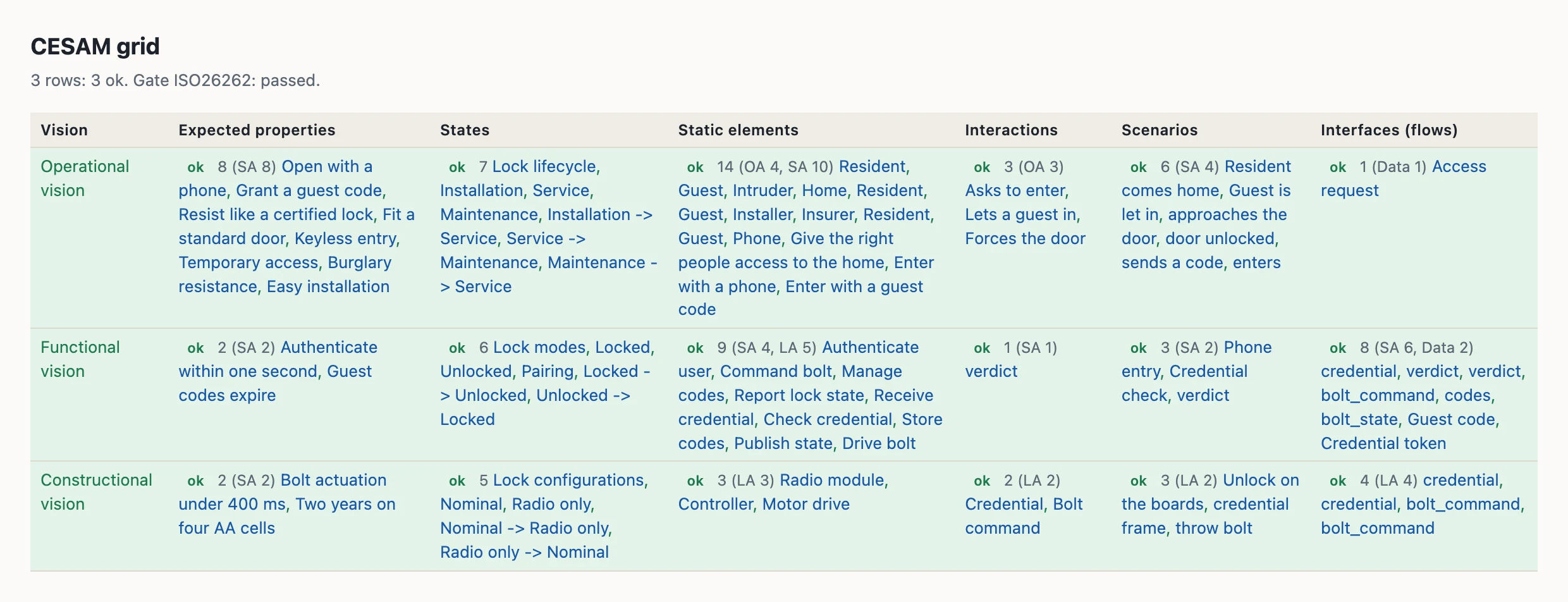
Where each element goes
Every kind of the metamodel names its cell (the CESAM: line of spec/METAMODEL.md). A few kinds are placed by what the element is about:
- Requirements: by
vision:, else by their block:requirements stakeholder { }is operational,requirements functional { }(orsystem) functional,requirements technical { }constructional; else by what satisfies them (a function: functional, a component: constructional). - State machines: by
kind:—lifecycle,functional_modes,technical_configurations— else by their name ("... lifecycle", "... configurations"), else functional modes. - Scenarios: by
vision:, else by their participants: between functions, functional; between components, constructional; else operational. - Exchange items and classes: by the exchanges they type.
What CESAM adds to the language
model SmartLock { method: "cesam" }

requirements stakeholder {
    stakeholder "Resident" { id: "STK-RES" category: "user" interest: "Enters without a key" influence: High }
    concern "Keyless entry" { id: "NEED-1" stakeholders: ["STK-RES"] }   // the stakeholder's need
    req "STK-REQ-1" "Open with a phone" { priority: High frames: ["NEED-1"] }
}

state_machine "Lock lifecycle" {
    kind: "lifecycle"
    initial: "Installation"
    state Installation { context: ["STK-INS"] }        // the operational context of the phase
    state Service { context: ["OA-RES", "OA-INT"] }
}

state_machine "Lock modes" {
    kind: "functional_modes"
    initial: "Locked"
    mode Locked { during: ["Lock lifecycle.Service"] }  // when the mode is available
}

state_machine "Lock configurations" {
    kind: "technical_configurations"
    initial: "Nominal"
    state Nominal { realizes: ["Lock modes.Locked"] }   // the modes the configuration provides
}

scenario "Resident comes home" { capability: "UC-1" participants: ["SA-RES", "SA-PHN"] }stakeholder(in arequirementsorsystem_analysisblock): who the system matters to. Aconcernnaming it instakeholders:is its need; the requirements thatframes:the concern are its stakeholder requirements. Exported to SysML v2 as apart def.kind:on a state machine gives it its CESAM role; a value outsidelifecycle,functional_modes,technical_configurationsis an error.realizes:,during:andcontext:on states tie configurations to modes, modes to lifecycle phases, phases to their operational context. A reference to nothing is an error; to a state of another role (a configuration realizing a lifecycle phase), a warning (cesam.role).vision:on a requirement, a scenario or a state machine overrides what the compiler infers.capability:on a scenario names the use case it illustrates.
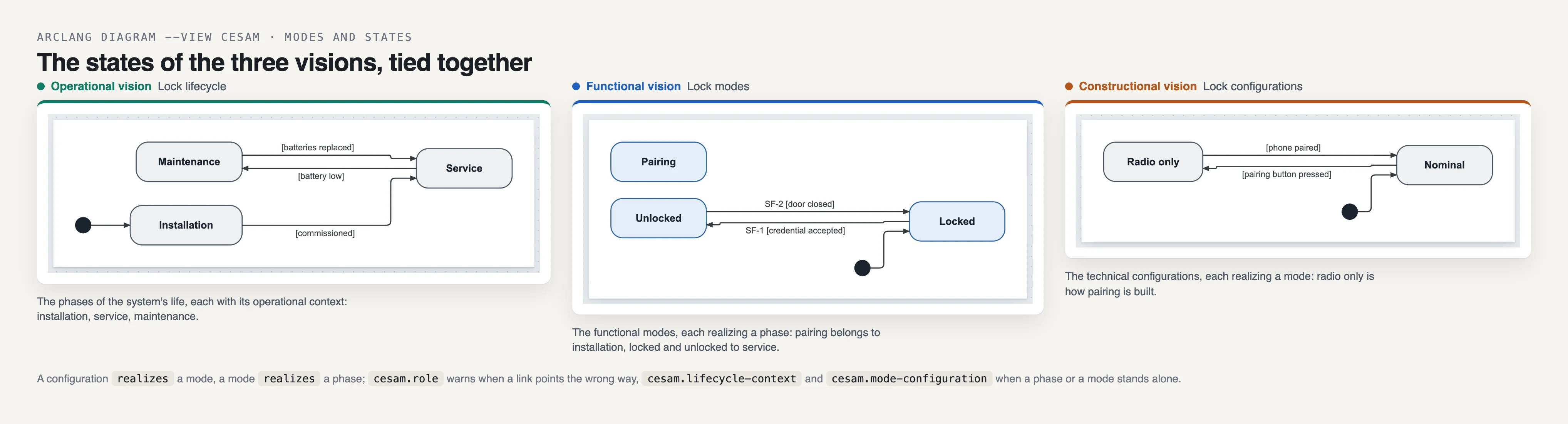
The method's rules
arclang check model.arc --lint --method cesam reports what CESAM expects and the model does not have yet. A model declaring method: "cesam" gets them on every check, in check --json findings, and as warnings of the production gate (methodology.cesam). arclang rules documents each:
| Rule | Asks for |
|---|---|
cesam.view-empty |
every view of the grid modelled |
cesam.stakeholder-need |
a need (concern) for every stakeholder |
cesam.need-stakeholder |
a stakeholder for every need |
cesam.need-requirement |
a requirement framing every need |
cesam.mission-use-case |
a use case (capability) for every mission |
cesam.use-case-scenario |
a scenario (or functional chain) illustrating every use case |
cesam.lifecycle-context |
an operational context for every lifecycle phase |
cesam.mode-configuration |
a technical configuration realizing every functional mode |
cesam.requirement-vision |
a vision for every requirement |
cesam.role |
relations between states of the right roles |
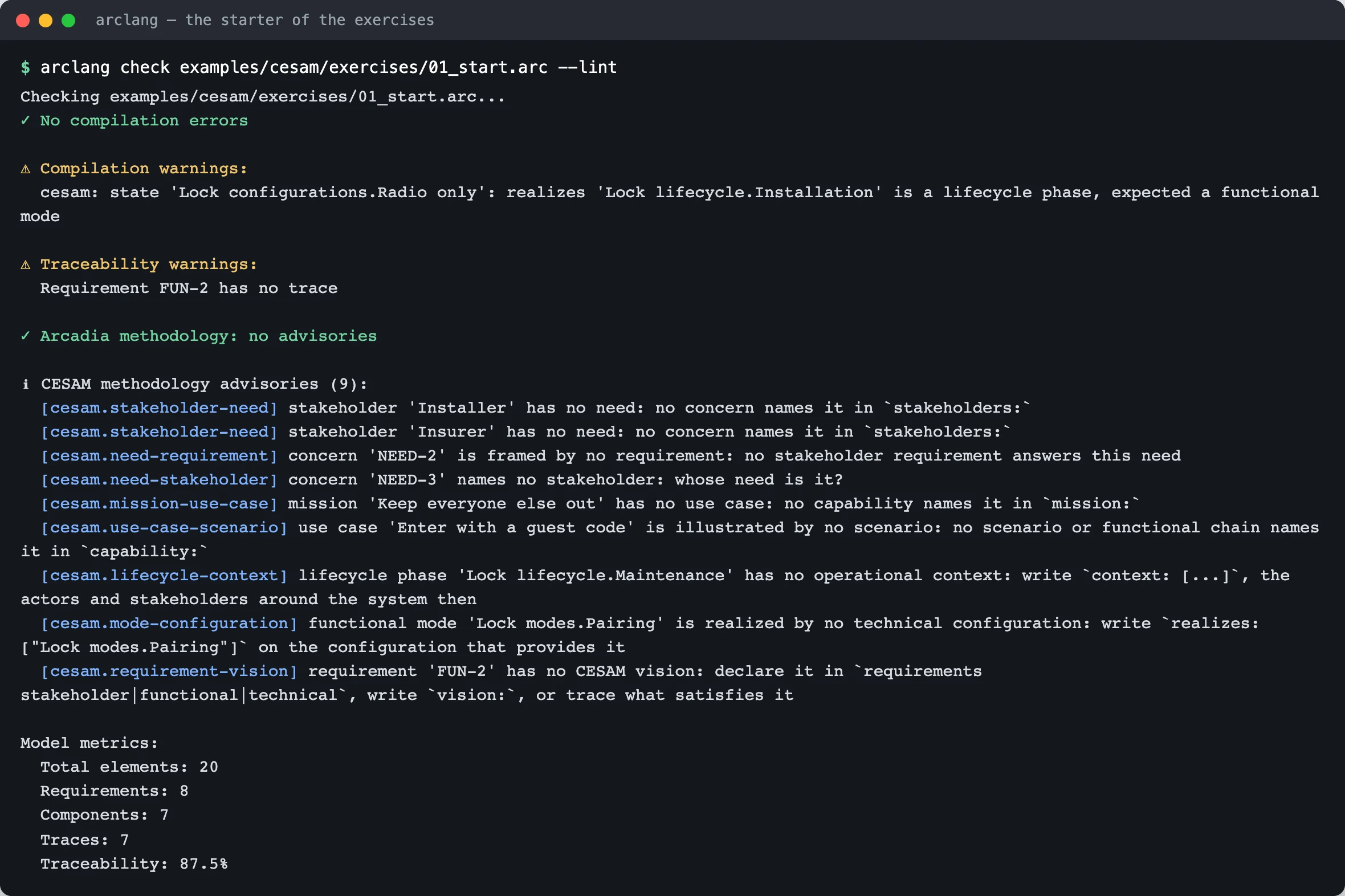
Diagrams
arclang diagram model.arc -o views.html -f html --view cesam draws the viewpoint diagrams of the CESAM views, titled and ordered by the grid (lifecycle, use cases, environment, operational scenarios, then the functional, then the constructional views). The mapping follows CESAMES' CESAM + Capella webinar (2023):
| CESAM view | Capella diagrams | ArcLang view |
|---|---|---|
| Stakeholders and use cases | OEBD, CSA, MCB | cap |
| Environment diagram | OAB, SAB | oab, sab |
| Lifecycle, functional modes, technical configurations | M&S | msm:<machine> by its kind: |
| Operational, functional, constructional scenarios | ES, FS | es:<scenario> by its vision |
| Constructional interactions | LAB, PAB | lab, pab |
| Product breakdown | LCBD, PCBD, EPBS | pbs |
| Interfaces | CDB | cdb |
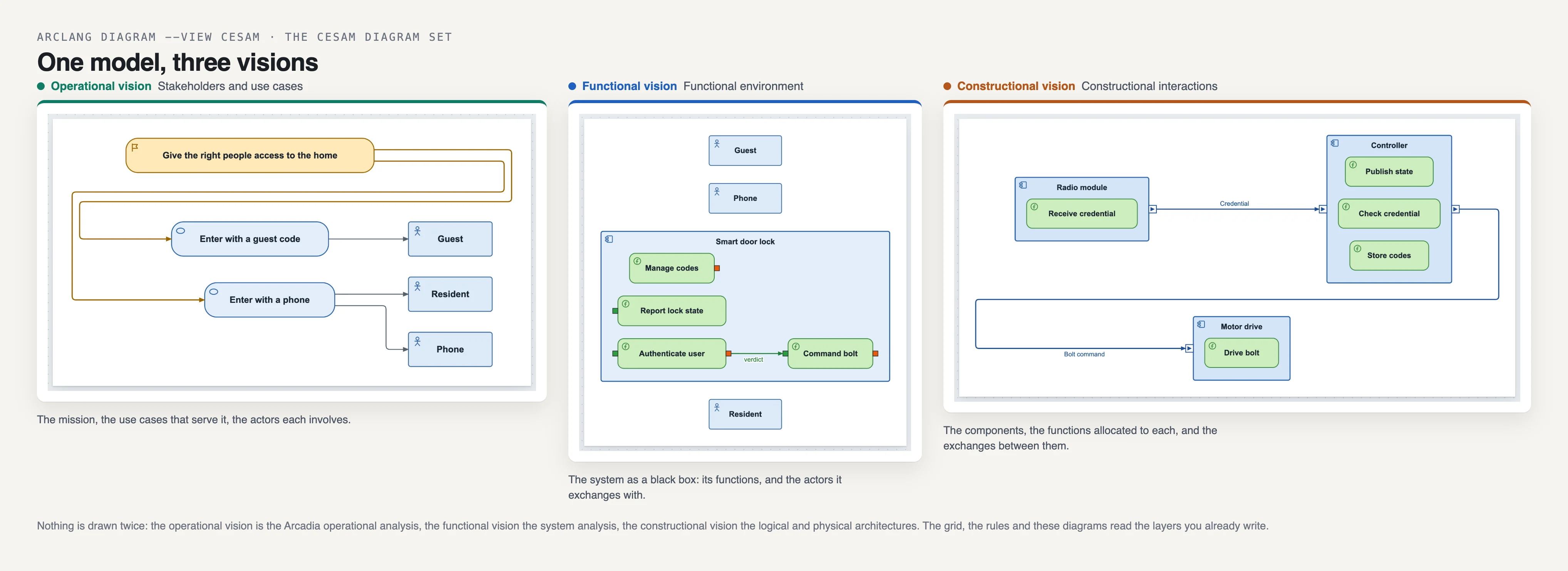
Starting a model
arclang new door --template cesam writes door.arc: a model following CESAM with one section per vision, each element a placeholder to rename, which compiles and passes check --lint. The complete example is examples/cesam/smart-lock/smart_lock.arc. The CESAM tutorial takes a model with holes and fills it, exercise by exercise, with screenshots of every step.
Agents
The MCP server's arclang_cesam tool returns the grid of a model with the method's advisories, so an agent can answer "what is missing in my functional vision?" from what the compiler computes.